
01The Operational Bottleneck
The Hidden Chaos of Multimodal AI Prototyping
Iterating social media assets with multimodal models like Gemini 3.8 and ChatGPT Vision unlocks superhuman ideation speed. In less than 45 minutes, you can generate 20+ hook pivots, visual metaphors, and layout experiments.
However, bridging that creative explosion into Figma for client review or production delivery usually devolves into a manual nightmare:
Asset & Revision Sprawl
21+ loose files scattered across local directories with unindexed filenames, making auditing past variants nearly impossible.
Canvas Scenegraph Chaos
Automated scripts dump objects at the Figma page root, leading to unconstrained text boxes, overlapping cards, and unmanageable layers.
Color & Gamut Clipping
JPEG compression washes out vibrant brand pigments (like TPC Crimson #F43F5E) and degrades typographic sharpness.
02Creative Strategy & Copy Pivots
Why the Checklist Failed (and the 7-out-of-10 Pivot Succeeded)
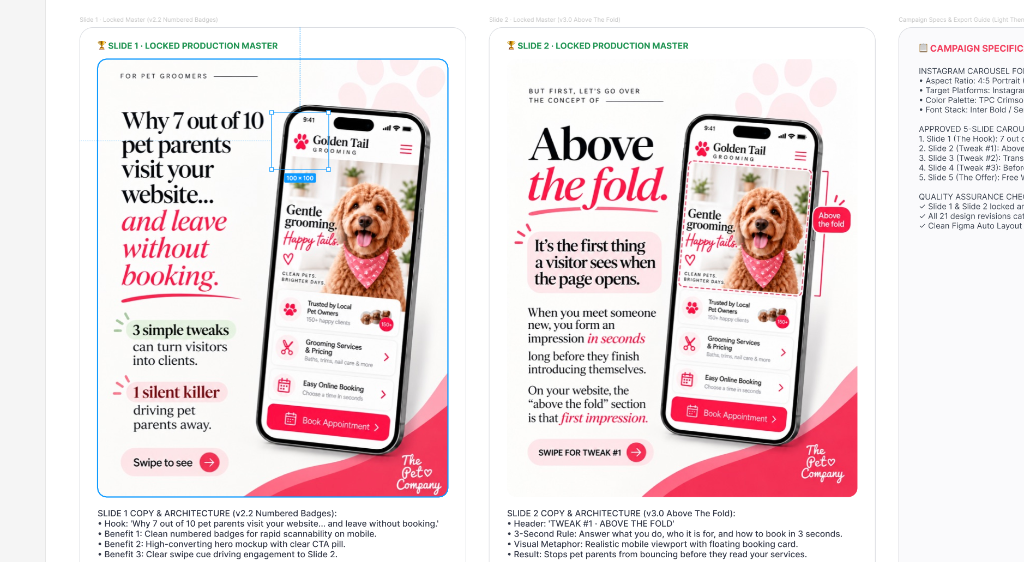
Our test case was a 5-slide educational carousel for ThePetCompany.love, targeting busy boutique pet groomers. Here is what our iterative critique revealed:
From “Homework Checklist” to Loss Aversion
Initial tests framed Slide 1 as a “Pet Groomer Website Checklist.” Pet groomers are exhausted from operational labor; a checklist felt like homework.
Pivoting to “Why 7 out of 10 pet parents visit your website... and leave without booking” triggered urgent loss aversion. Pairing it with numbered badges (1, 2, 3) and a clean mobile mockup yielded the winning hook.
The 3-Second “Above The Fold” Metaphor
Early wireframes attempted to show an entire website page with multiple scroll sections on one slide, resulting in unreadable 6px micro-text.
We shifted to a realistic mobile viewport isolating only what is visible before scrolling: clear service categories, a happy doodle photo, and a floating “Book Appointment ➔” pill.
03Final Deliverables
The 1:1 Instagram Carousel Production Deliverables
These are the raw, uncompressed 4:5 portrait master slides rendered directly on the canvas without outer card chrome, ready for export and social scheduling:


04Technical Implementation
The Tri-Part Daemon & Bridge Architecture
To achieve deterministic board creation from code without relying on fragile browser automation, the system uses three synchronized layers:
- 01
macOS Launchd Relay Server (`localhost:3055`):
Maintains client channels, tracks command IDs, queues requests, and discards disconnected socket responses.
- 02
Claude Talk to Figma Desktop Plugin:
Subscribes to channel WebSocket events and invokes native Scenegraph calls (`figma.createSection`, `figma.createFrame`, `figma.createImage`).
- 03
Antigravity / Bun Automation Harness:
Streams lossless base64 image payloads, calculates section bounding boxes, and enforces nested parent-child hierarchies.
05Trade-Off Analysis
Architectural Pros & Cons
The Advantages
- Zero Manual Figma Plumbing: Entire 21-card boards generated from a single terminal command.
- Scenegraph Integrity: Auto-grouped Sections and wrapped text boxes prevent canvas clutter.
- Display P3 Color Gamut: Uncompressed PNG byte streaming keeps brand reds vibrant.
- Instant Social Export: Native 1080×1350 frames ready for immediate PNG/PDF publishing.
The Trade-offs
- Daemon Dependency: Requires local port 3055 daemon active in background.
- Sandbox Payload Ceiling:Figma's plugin sandbox caps single image byte arrays at 5MB.
- Channel Handshake: Requires matching channel ID between the bridge client and running plugin.
06Resource Bundles
Downloads & Project Assets
Everything required to mount the WebSocket bridge and replicate this pipeline locally.
Figma MCP Bridge Plugin Bundle
The complete development manifest and JavaScript payload to import into Figma Desktop (Plugins → Development → Import plugin from manifest).
figma-mcp-plugin.tar.gz · 44 KBCarousel Board Builder Script
Automated Bun / TypeScript script that connects to the WebSocket bridge and constructs the section hierarchy, masters, and 1:1 IG export frames.
build_carousel_board.ts · 7 KBInstant Orchestration
Make This Work For Me
One-click prompts to replicate this exact Figma pipeline across your preferred AI platform.
Use the skill `figma-carousel-curator` to audit our carousel revisions and build an approved Figma review board.
1. Connect to the Figma WebSocket bridge on channel "6e1xun9a" (port 3055).
2. Clean existing loose canvas nodes on page "Post 1".
3. Ingest original lossless 8-bit RGB PNGs via base64 directly into Figma frames.
4. Construct top-level Figma Sections:
   - ⭐️ FINAL APPROVED MASTERS (Slide 1 and Slide 2 side-by-side with copy notes)
   - 📱 INSTAGRAM CAROUSEL SLIDES (1080x1350, 0px corner radius, zero chrome)
   - Categorized revision matrices with wrapped critique notes (width: 432px).
5. Verify zero node collisions and strict parent-child layer nesting.
- WebSocket Bridge port 3055
- Figma plugin loaded from manifest
- Lossless Display P3 PNGs